

Google NotebookLM, which I have frequently recommended on this blog, has been enhanced with new output features including infographics, video overviews, and slide decks. In this article, I would like to introduce how to use these features for researchers with practical examples.
What is Google NotebookLM?
Google NotebookLM is a study note creation tool that fully leverages AI, provided by Google. Simply put, you input source materials, and AI extracts information from those sources to explain and teach you.
Unlike web applications for large language models such as ChatGPT and Gemini, it outputs information only from specified sources, making it possible to use AI limited to reliable sources or information you particularly want to learn. This is its key strength.
For an explanation of how to use the previous features, please refer to the following article.
NotebookLM's Output Features
The basic function is to ask questions about sources and receive text responses, but it also has various other output capabilities. Let's look at each feature in order, including newly added functions.
All features can be accessed from the right side of the NotebookLM screen. For features where you can specify output content with prompts, you can edit them by clicking the pen icon.
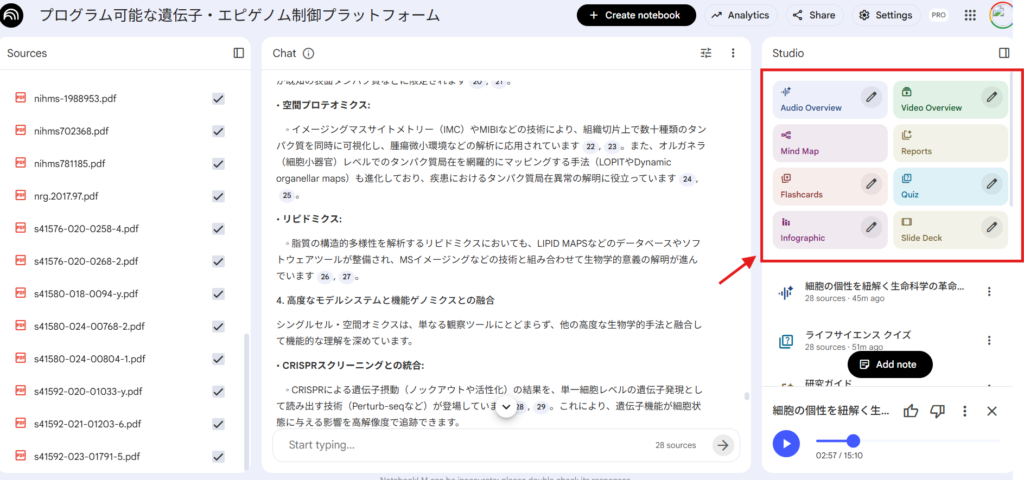
By the way, you can select which sources to output from by adjusting the checkboxes on the left side.
Additionally, you can specify the output language from Settings in the upper right corner, so choose your preferred language. Japanese specification is also possible.
Roughly classified, there are 6 output features for understanding overview:
- Audio Overview
- Video Overview
- Mindmap
- Reports
- Infographic
- Slide Deck
And there are 2 quiz features for learning:
- Flashcards
- Quiz
Let's look at the content of each.
Audio Overview
This is a feature that explains the content of sources in conversational audio format like podcasts. It's excellent for obtaining information while on the move about content you want to study. The conversation can be somewhat verbose, but it's fine for roughly grasping the overview.
You can also specify the content with prompts, or choose what kind of content to create from 4 types: deep dive, brief, critique, and debate.
By the way, probably because Japanese text is generated first and then converted to audio, there are occasional mistakes in kanji readings. Japanese seems to fall into the category of languages that are difficult to convert to audio.
Advantages
- Can grasp the overview while doing other work
- Easy to absorb like a podcast due to conversational format
Disadvantages
- The format is mostly the same, so it can get a bit boring with repetition
- Content tends to be verbose
Video Overview
It summarizes the overview in video format with slide-like images and audio. For example, when summarizing a review of cutting-edge biochemistry research, the following video slide is created.
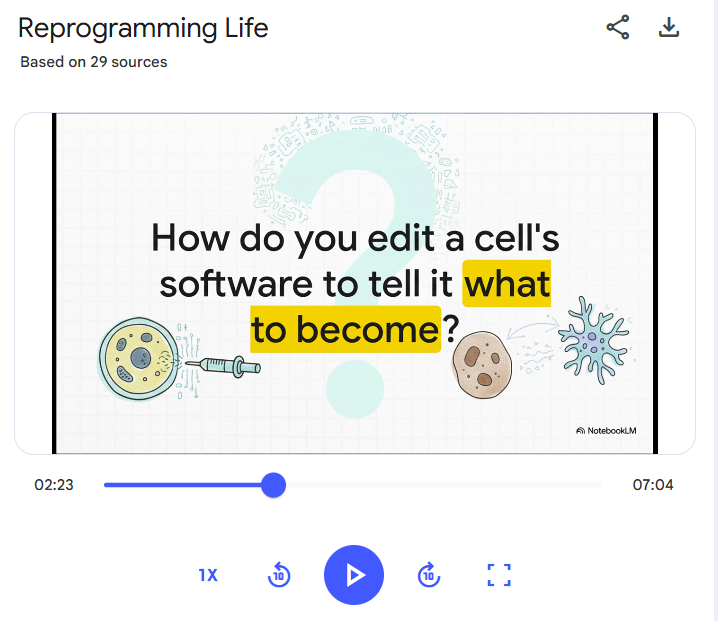
Also, it seems that with updates, PDF figures and tables can now be imported (previously it was text only). Tables and figures from imported PDFs occasionally appear in videos. However, it's not clear which source the information comes from in the video.
Advantages
- Memorable because it explains through both visual and audio aspects
- Easy to understand with many images
Disadvantages
- Conceptual diagrams can be inaccurate
- Somewhat verbose, though not as much as podcasts
- Unclear which source figures and tables are cited from
Mind Map
It classifies and organizes terms that appear in sources in a tree structure, and when you click on them, it explains them in a chat screen. For example, like this.
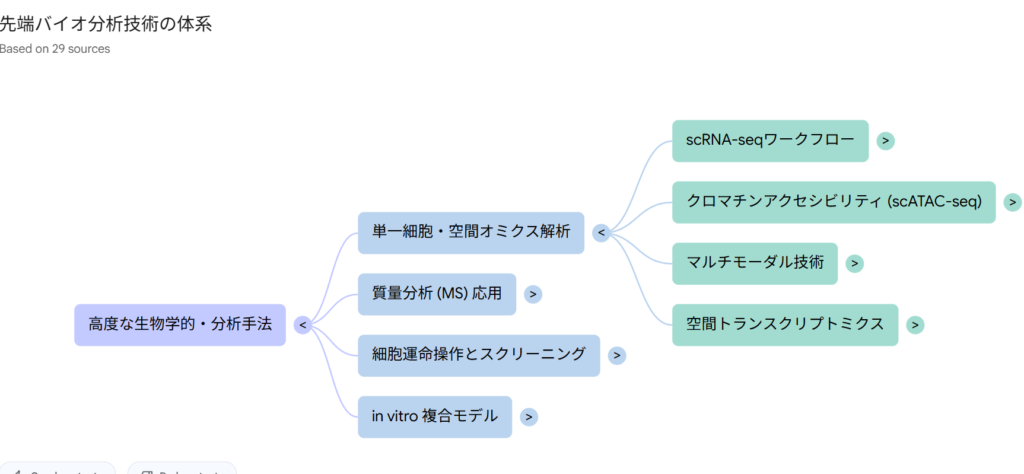
When learning new content, it can be neatly classified in your mind, which is helpful for learning.
Advantages
- Content is classified concisely, making it easy to organize and absorb
Disadvantages
- Doesn't summarize well if selected sources lack consistency
Reports
This is a feature that creates long-form reports from sources. You can select what kind of report to create in advance or specify it with prompts.
It can handle a wide range of purposes, such as Brief Doc for overall summaries and creating study guides for learning. For example, if you select "Study Guide," quizzes and answers are presented at the beginning, which is useful for self-study.
Learning is difficult to retain by just passively reading, so actively learning while utilizing such features will also help with memory. It would have been nice to have something like this for graduate school entrance exam essay questions.
However, this report lacks the crucial citation verification feature in NotebookLM. For researchers, the inability to check for possible hallucinations is a major drawback.
Advantages
- Can organize information in long form that is difficult to produce in chat alone
- Can output according to the direction you want to utilize
Disadvantages
- Less memorable because it's text-based
- Cannot verify citations
Flash Cards
Flash cards enable memorization in a question-and-answer format. This is useful when you want to memorize content. For example, like this. Click to see the answer written on the back.
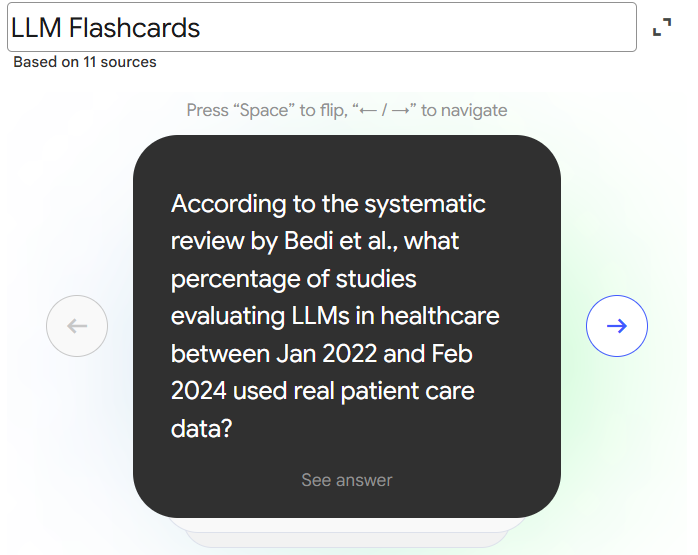
Advantages
- Easy to memorize learning content concisely
Disadvantages
- Doesn't lead to deep understanding of content
Quiz
It outputs multiple-choice quizzes that you can answer by clicking. This is also positioned as a tool to promote learning. For example, like this.
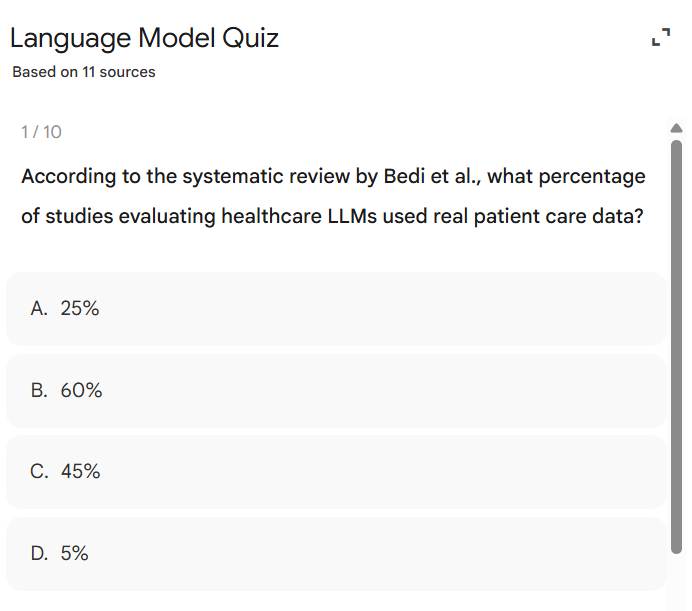
By the way, for incorrect answers, you can press the Explain button to have the content explained in the chat screen, allowing you to get immediate feedback from the actual materials.
Also, you can adjust to some extent what content to generate from and what difficulty level to use in the edit screen.
Advantages
- Easy to check understanding
- Easy to get feedback from actual sources
Disadvantages
- Difficulty and content are hard to grasp until you try it
- Cannot create image-based questions because it's text-based
Infographic
It can summarize the entire content in a single illustration. Probably because Google's image generation function Nanobanana has been enhanced, issues like "strange kanji" have been significantly reduced compared to before.
For example, when summarizing a recent life science review as a single image, it looks like this.
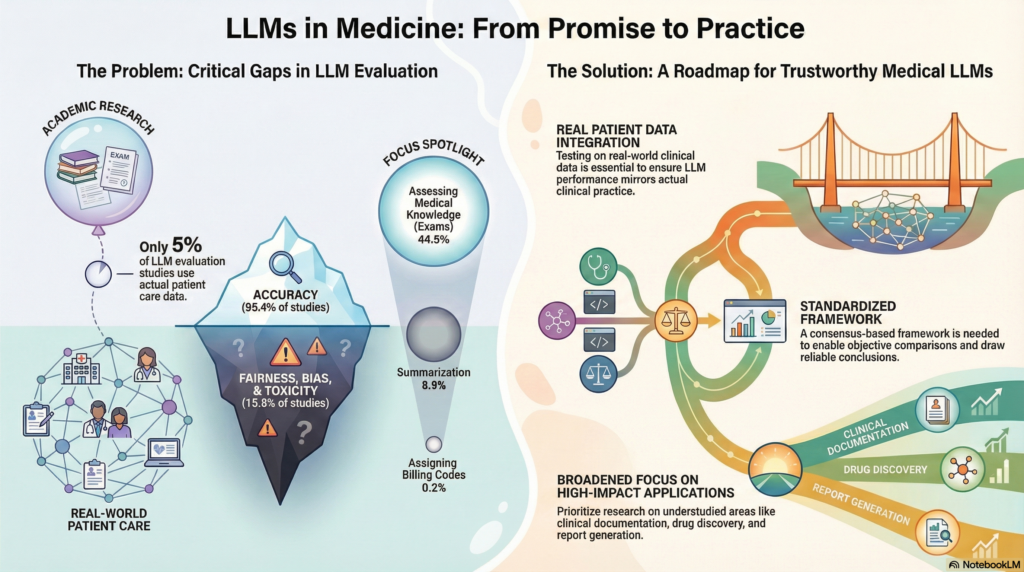
I think it's sufficient for showing as a summary in one image. You might consider appropriately correcting concerning parts using Gemini's Nanobanana. Or you could extract and edit text using tools like Canva.
Advantages
- Content can be quickly grasped visually
- Memorable
Disadvantages
- Difficult to edit
- Difficult to generate what you intend
- Citations are not written appropriately
Slide Deck
This is the long-awaited slide generation feature. Like infographics, I think the quality is quite high. Let's look at an example.
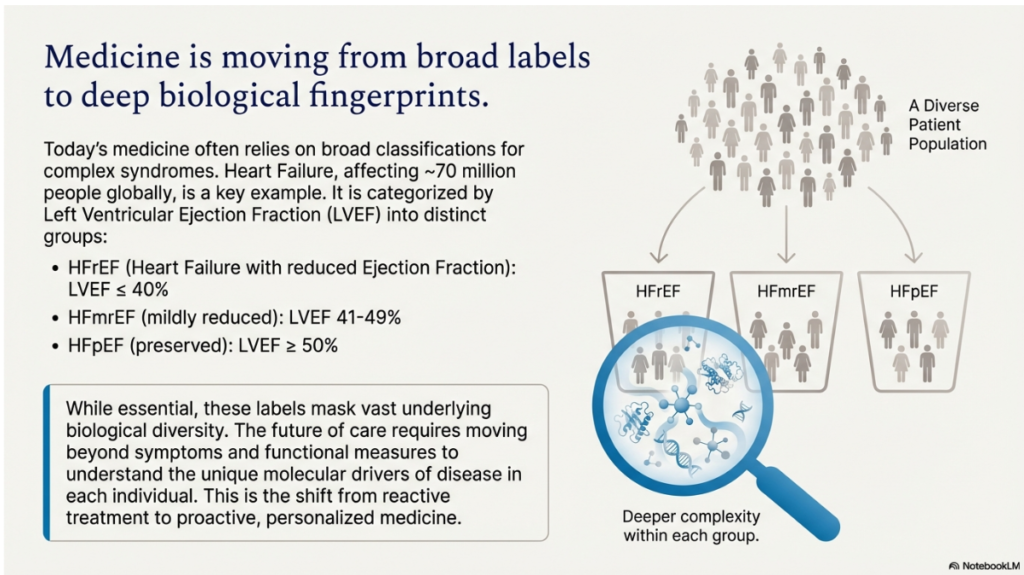
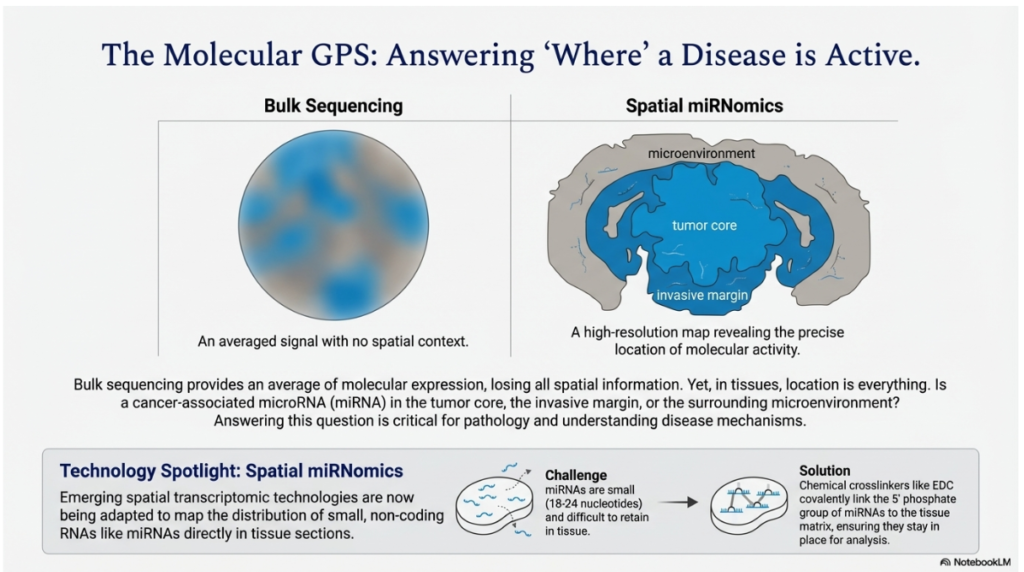
The quality at first glance is a cut above previous slide generation features. The sense of incorporating tables is particularly good.
By the way, if you check the original source, you can find this table, so you can see that it was created after reading images and tables from sources (Sorry, it's written in Japanese).
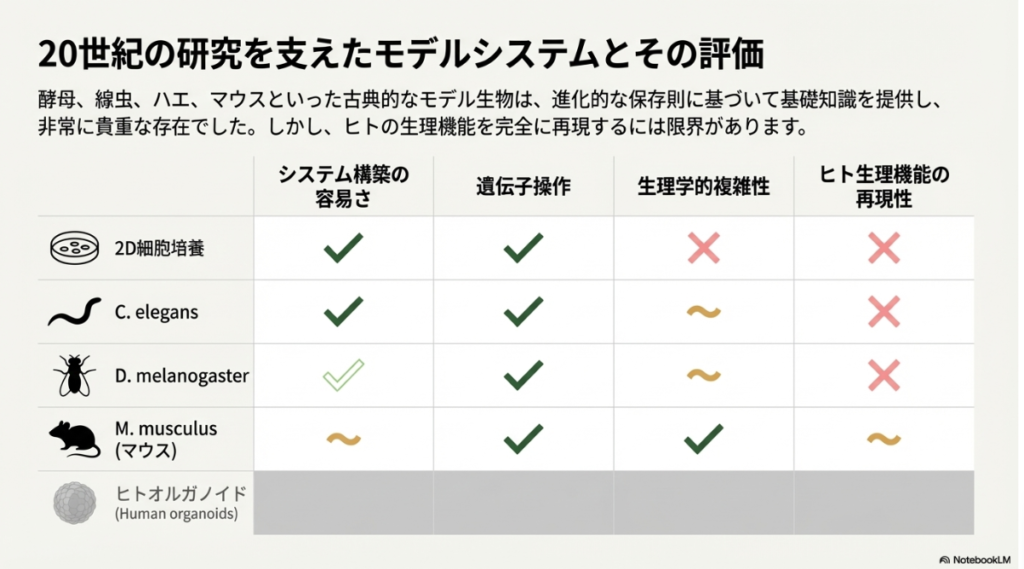
While Claude generates slides based on html, I think NotebookLM generates such things based on images, but unfortunately, you can only output PDFs and cannot edit them, so the details are unclear.
By making slides, it's easy to grasp the overview and share information. However, because it's unclear which sources are cited and editing is not possible, it cannot be used for actual presentations.
Advantages
- Overview can be understood clearly in slide format
- The layout and sense of text information + figures and tables are good, serving as a reference for slide creation
Disadvantages
- Citations in content are unclear
- Cannot be edited
Practical Applications for Researchers
I would like to introduce some examples of how I actually use it in my research.
Application 1: Use for Writing Papers and Creating Presentations
When creating papers or presentations, you collect necessary reference documents and papers, but doesn't it sometimes become confusing about what was written where?
Also, when you want to collect content that touches on a certain matter comprehensively, wouldn't it be convenient to be able to search all at once?
This is one of the recommended methods to use in such cases.
First, collect the literature you want to use with paper management software like Zotero. If you use Zotero, you can export PDFs all at once or put literature directly into NotebookLM from Google Drive. Please refer to the article below.
After that, just search for what you want to know in chat. Chat output is somewhat flexible, so you can also summarize in table format. It's also convenient when looking at Methods comprehensively.
What's important is that it clearly shows citations and sources, and clicking on them makes it easy to verify citations.
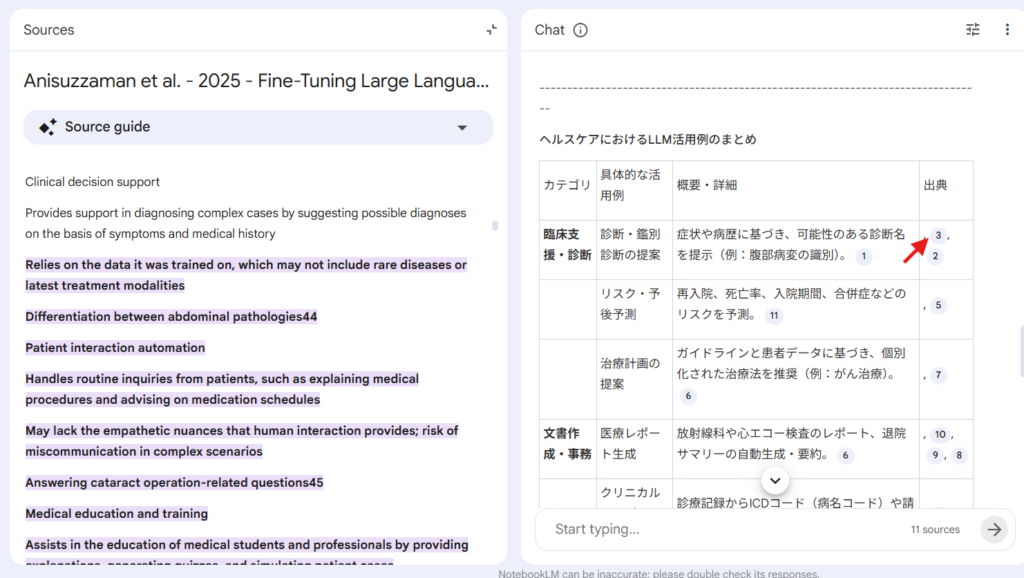
▲Click on the red arrow and the relevant part of the literature will be highlighted on the left side
However, if you haven't read the literature you want to cite yourself, you cannot verify the information, and you cannot judge whether it's an appropriate reference document (for example, whether the information is written as experimental results or mentioned in the discussion makes a completely different meaning for citation).
I think this usage method is premised on reading the papers yourself or using it while reading.
Also, the new features introduced in the first half are rather useful for learning new content. They will be more useful in situations like Application Example 2 below.
Application 2: Use for Grasping Overview of Prior Research and Collecting Extensive Information
NotebookLM is also very useful when grasping the overview of a research field you are newly starting or collecting papers for regular information updates.
First, collect the necessary papers. To collect overviews, I recommend collecting review papers. I use a combination of the following methods:
- Search for important papers and reviews using Deep research features like ChatGPT
- Extract closely related reviews using citation analysis tools like Inciteful
- Search using GPT's recommended search formulas in search databases like Pubmed
Please refer to the following articles for Deep research and citation analysis tools.


Deep research is convenient, but the difficulty is that paid papers are hard to find. So the recommended complementary method is the third one mentioned above: having LLMs create search formulas. Please also check the following article for this.
Download all the reviews you're interested in from those collected by these methods. Reviews can have quite a large number of pages, so although there's sufficient information, the difficulty was that they were hard to approach, but NotebookLM makes them much easier to read.
For example, if you collect reviews about the relationship between LLMs and medicine that I also used as an example earlier and have it create an infographic, it looks like this.
It's easier to read after grasping the overview than starting to read a long review without prior information, right?
Also, another method I've been hooked on recently is collecting the latest review articles by setting up database alerts, putting them into NotebookLM, and digging into topics of interest.
The method for setting up alerts for the latest papers is summarized in the following article.
If you download the papers collected here and put them into NotebookLM, you can create a wonderful environment where you can listen to a podcast of your favorite latest information while learning more details by chatting or narrowing down sources. This is the most recommended method for information updates.
Precautions for NotebookLM
Finally, I would like to mention some points to be careful about even with the too-convenient NotebookLM, with self-reflection.
Hallucinations Don't Become Zero
While it outputs information while citing literature, hallucinations don't become zero. Verification of information sources is always necessary.
Also, special caution is needed when citing in papers or presentations. When using for these purposes, you must consider not only whether it's properly written in the paper, but also whether that paper is really the one you should cite. For example, you need background information such as whether that paper was the first to publish those results, whether it's truly a method that matches the current content, etc.
For this reason, I think proper citations cannot be made unless used on papers you have properly read, so please absolutely avoid citing literature you haven't read relying on NotebookLM.
Information Can Be Lost If Sources Are Not Appropriately Selected
When you input various literature all at once, there's a tendency for them to be mixed together and forcibly summarized. It can also happen that information from some literature is not extracted well. I think there's nothing NotebookLM can do about this, so you need to consciously select which sources to use.
Summary
Google NotebookLM is an excellent tool that enables "information extraction from literature" and "diverse output of information".
It is useful both as an aid for work that requires accurate citations such as paper writing, and when learning about new fields.
There are currently not many similar tools that are this easy to use and convenient, so I recommend you try using it and get used to it.
コメント